

Context Engine Settings
Control which sources — knowledge, solved tickets, and macros — Stylo draws on when building response context, globally or per brand.
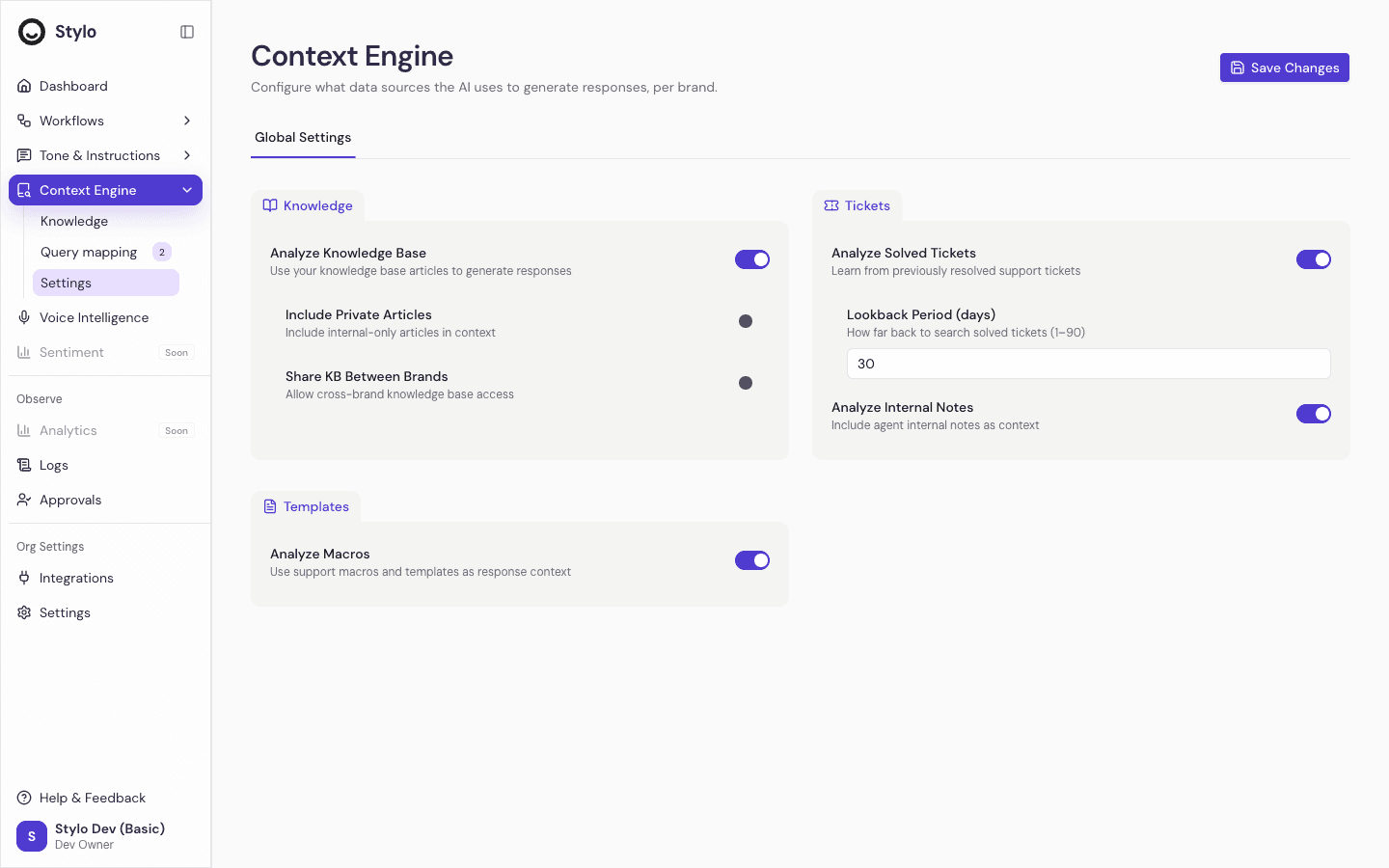
Context Engine Settings control which sources Stylo can draw from when assembling the context behind a response. The page is organized into three sections — Knowledge, Tickets, and Templates — and applies either to the whole workspace (the Global Settings tab) or to one brand (a brand tab).
Members who can view brand settings can view this page; only members who can manage brand settings can save changes. Changes save per selected tab, not across every brand at once.
Knowledge
| Field | Type | Default | Effect when toggled |
|---|---|---|---|
| Analyze Knowledge Base | toggle | On | When off, Stylo skips knowledge-base retrieval entirely — no articles are searched and no knowledge is added to context. |
| Include Private Articles | toggle | Off | When on, private (non-public) help-center articles are eligible for retrieval. When off, only public articles are searched. Disabled in the UI while Analyze Knowledge Base is off. |
| Share KB Between Brands | toggle | Off | When on, knowledge from other brands can be retrieved for this brand's tickets. When off, retrieval is scoped to the ticket's own brand. Disabled while Analyze Knowledge Base is off. |
These three controls are enforced at retrieval time — turning a knowledge toggle off changes what Stylo searches for the affected scope.
Tickets
| Field | Type | Default | Range | Effect |
|---|---|---|---|---|
| Analyze Solved Tickets | toggle | On | — | Intended to control whether previously solved tickets inform responses. |
| Lookback Period (days) | number | 30 | 1–90 | Intended to bound how far back solved-ticket history is considered. Applies only when Analyze Solved Tickets is on. |
| Analyze Internal Notes | toggle | On | — | When off, internal (non-public) notes are filtered out of the conversation before Stylo processes it. Enforced during message preprocessing. |
Analyze Solved Tickets and Lookback Period are stored and editable, but the current solved-ticket retrieval path does not yet read these values — so toggling them may not change behavior today.
Analyze Internal Notes is enforced.
Templates
| Field | Type | Default | Effect |
|---|---|---|---|
| Analyze Macros | toggle | On | Intended to control whether macros and support templates are included in context. |
Analyze Macros is stored and editable, but no enforcement hook was found in the response-generation path — toggling it may not change behavior today.
Global settings and brand settings
Stylo keeps one global Context Engine settings row for the workspace, created automatically the first time the page loads. If your organization uses brand-specific brand settings, matching brand tabs can be created so each brand can use different context rules.
- Use Global Settings when the same rules should apply across the workspace.
- Use a brand tab when one brand needs different context behavior — for example, a different solved-ticket lookback or different knowledge handling.
A brand row overrides the global default for that brand. The global row cannot be deleted; it is the base configuration for the workspace.
How to update Context Engine Settings
Open Context Engine from the workspace sidebar.
Select Global Settings or the brand you want to edit.
Adjust the Knowledge, Tickets, and Templates controls.
Select Save Changes. The selected tab is saved on its own — other brands are unchanged.
How this relates to knowledge base settings
Context Engine Settings is not the same as the settings for an individual knowledge base.
- Use Context Engine Settings to tune source behavior at the workspace or brand level.
- Use a Knowledge Base settings tab to configure one specific knowledge base — whether it's enabled, whether it includes private articles, and which brands it serves.